
Someone asked us recently what our AI setup is. It’s a fair question, and the honest answer is longer than “we use Claude Code”.
The problem every setup has to solve is that an AI agent starts each session knowing nothing. It doesn’t remember yesterday’s fix, the convention you explained last week, or the bug another project already hit. Unless you write those things down somewhere it will look, you end up explaining them again. And again.
This post walks through where our agents look: the layers of instructions, the Knowledge Base, the skills we wrote and the ones we installed, the non-code side, and why all of it lives in git. Throughout, we’ll use our in-house issue tracker, Clarity, for examples. We’ve written before about giving it an MCP server.
This is how Xerodonia works with AI. Your mileage may vary.
The short answer
We use Claude Code, and every session starts by loading one git repo: our Knowledge Base. It holds our coding standards, our decisions, the lessons from every project, a card for each project, our agents, commands and skills, and even the global instructions themselves. Change a file there, and every future session, in every project, changes with it.
The instructions stack
Our rule of thumb is to keep each instruction file short and to point to further instructions rather than pasting them in. It’s the old Unix idea of small pieces that each do one job, applied to text.
Claude Code gives you two ways to do that. A CLAUDE.md can import a single file with @path (such as @docs/architecture.md). And a .claude/rules/ folder can hold rules that apply only to some files: a rule whose front matter says paths: ["src/lib/**"] is loaded only when the agent works there. Imports keep files manageable, but everything imported still loads at the start of every session; path-scoped rules load only when they’re needed.
Every session reads three layers of instructions, from the general to the specific. Each layer says only what the one above can’t.
- Global instructions (
~/.claude/CLAUDE.md). They’re short: who the agent is (a senior Swift developer), how we work (plan first, pause after each stage, ask before committing), and where the Knowledge Base is. Then they import 25 standards with lines like@~/.claude/documents/swiftui.md: one each for Swift, SwiftUI, SwiftData, git, tests, linting, Readmes, websites, App Store Connect and more. - The Knowledge Base, which the global file tells the agent to use: read the project’s card at the start of a session, search the notes before solving a problem, and put any lesson that would help another project there. When the agent is working on the Knowledge Base itself, the repo’s own
CLAUDE.mdadds its rules (one fact per note, required front matter, run the checks before committing). - The project’s own
CLAUDE.md, in the repo’s root. It holds what’s true of that one project: its architecture, conventions, gotchas and history. It points into the Knowledge Base withkb:paths (such askb:knowledge/swiftdata/cloudkit-on-a-sandboxed-mac-needs-network-client.md) rather than copying the lesson.
The layers work because each one knows its place:
- A standard sets the default; a project can make an exception, but only in writing. New projects target iOS 27 and macOS 27, and “a project may go lower or higher only when its
CLAUDE.mdsays why”. Clarity’s does: it stays on 26 until it’s next updated. - A lesson lives once, in the Knowledge Base, and projects link to it.
- Auto-memory now holds only facts about one project. Claude Code keeps its own memory per folder, but those memories were invisible, unversioned and stuck in one folder. Anything general has moved into versioned notes in the Knowledge Base.
- Commands glue the layers together.
/start-of-sessionreads the project’s docs and its Knowledge Base card, checks Clarity and the Xcode tools, and reports back./end-of-sessionupdates the required documentation (status, journal and changelog) before the day’s commit.
The Knowledge Base
The Knowledge Base is a private git repo of plain Markdown: about 470 notes, written for us and for agents alike. We started it at the end of October 2026, and it has 128 commits so far. It changes most days.
One test decides what goes in: would it have saved time in a different repo? If yes, it’s a note. If it only matters to one project, it stays in that project’s own docs.
The notes follow a few rules, which keep them useful to an agent that has never seen them before:
- One fact or lesson per note. If the title needs “and”, it’s probably two notes.
- The title states the lesson, not the topic. “CloudKit needs every SwiftData relationship to be optional”, not “CloudKit relationships”.
- Every note has front matter: a title, a one-sentence summary, tags, sources, a
verifieddate and a status. An agent can judge whether a note is relevant without reading the whole thing, which saves tokens and context. - A note that turns out to be wrong isn’t deleted. It’s marked
superseded, and points to the note that replaced it. INDEX.mdlists every note on one line, built from that front matter. An agent can scan it in seconds, or search the notes directly.- A script checks it all. It validates the front matter, the file names and every link, and warns about notes nobody has verified in 180 days. It runs before every commit.
A tour of the folders
The folders fall into six groups, by what they’re for.
Global, agents, commands and skills: what every session loads
These four aren’t notes; they’re live configuration. Each one is linked into ~/.claude/, so Claude Code reads them straight from the repo.
global/holds the globalCLAUDE.mddescribed above.agents/holds our 12 custom sub-agents, each with a name and a speciality: Akira refactors without changing behaviour, Dara knows Core Data and SwiftData, Noor tests Metal rendering, Zuri writes DocC documentation, and so on. A note inlibrary/lists who does what, and the names still free for new ones.commands/holds our seven slash commands:/start-of-session,/end-of-session,/kb(search the Knowledge Base),/kb-update(check a project against the current standards),/initialise-new-project,/design-logoand/mac-app-review.skills/holds the skills we wrote (more on skills below).
Standards, knowledge, library and templates: how to do things
standards/: the 25 rules every project follows, imported by the global instructions. They cover Swift, SwiftUI, SwiftData, Metal, git, tests, linting, documentation, Readmes, websites and App Store Connect.knowledge/: about 370 how-tos and gotchas in 22 areas. Marketing is the largest (68), then Xcode (32), macOS (27), SwiftUI (24) and debugging (23). A typical title: “HealthKit compiles on the Mac, but there’s no Health data there”.library/: reference material from elsewhere. There’s a Markdown copy of 97 Things Every Programmer Should Know, profiles of 13 marketers (Steve Jobs, Rory Sutherland, David Ogilvy, Bill Bernbach and others) and the sub-agent roster.templates/: starting points for a note, a decision, a project card and a project definition, plus the build script every Xcode project copies to stamp its version number from git.
Projects and Xerodonia: what we have
projects/: a card for each main project (where it lives, how it relates to the others, key decisions, cautions and the notes that apply to it), plus a catalogue. A script builds the catalogue from every repo on the Mac, reading each Readme’s front matter and its git history, so it lists about 50 repos with their versions and never goes stale.xerodonia/: the company. Its brand colours and logo, domains, DNS and email, devices, identifiers, online services and the names of accounts. Never the secrets: a note names a credential and says where it’s kept.
Decisions and ideas: why things are the way they are
decisions/: 13 dated decisions that affect more than one project, each with its context and consequences. Two examples: version numbers come from plain git tags, and some repos stay local-only. When an agent wonders “why do we do it this way?”, the answer is here, so the question doesn’t come back every few weeks.ideas/: ideas for new apps, and assessments like a marketing review of an app.
Working together: how we like to work
working-together/ has 12 notes about us as collaborators. We plan first, and want the work paused after each stage. We check the work before it’s committed. We do the installing, uploading and deploying ourselves. Animation is part of the product, so don’t remove one without asking. And there’s how we like to be talked to, and the wording we want in anything a user will read. An agent that reads these makes fewer of the mistakes we’d otherwise correct by hand.
Automation: the Sunday batch
automation/ holds a batch of 15 unattended Claude Code jobs. Every Sunday the Mac wakes at 1:55 am, and at 2 am the batch starts: a read-only security audit and a docs check for each project, then a maintenance pass over the Knowledge Base itself. It takes 75 to 90 minutes, and each job has a US$5 spending cap.
The batch never commits anything. Audit findings become Clarity issues, docs changes wait as patches for us to review, and each run ends with a report in Clarity.
That rule came from experience. On the batch’s first real run, every job that tried to edit a file under ~/.claude was quietly refused, because an unattended session can’t write there, and every one of those jobs still reported success. The jobs now work on copies elsewhere, and we read what they actually changed, not what they say they did.
Skills: two of ours, 46 from others
A skill is a packaged set of instructions that Claude Code loads when a task calls for it. We have 48 installed, and we wrote two of them.
Our own:
knowledge-baseteaches an agent how to search, read and add to the Knowledge Base: where things are, how to search the index, and how to draft a note and ask us before committing it.marketing-guruis a marketing strategist for indie developers, with four modes: strategist, critic, operator and market researcher. It draws on Steve Jobs, Rory Sutherland, April Dunford, David Ogilvy and others, picking the thinking that fits the situation.
Other people’s:
| Group | Count | From |
|---|---|---|
| App Store Connect (releases, TestFlight, metadata, signing, pricing, screenshots) | 25 | The asc command-line tool’s skill pack |
| SwiftUI, SwiftData, Swift concurrency, Swift Testing | 4 | Paul Hudson |
| SwiftUI patterns, refactoring, performance, Liquid Glass, app packaging, changelogs | 6 | Thomas Ricouard |
| Accessibility audits (SwiftUI, UIKit, AppKit, and a general Swift one) | 4 | Various |
| Everything else: Core Data, design principles, interface writing, Mac conventions, App Store screenshots, Readmes, finding skills | 7 | Various |
The difference matters for version control. Our own skills live in the Knowledge Base. Other people’s stay where their installers put them, and the Knowledge Base keeps only a list: each skill, where it came from and how to reinstall it. A copy in our repo would quietly fall behind its upstream version, and the next install would overwrite it anyway.
The third-party skills also check our code against outside opinions. Our standards say what we want; Paul Hudson’s swiftui-pro says what the wider community considers modern SwiftUI. Where the two overlap, comparing them is often worth a look.
Beyond code
The biggest single area of the Knowledge Base isn’t Swift or Xcode. It’s marketing, with 68 notes.
Xerodonia is one developer, so the same setup has to cover selling the apps as well as building them. The non-code side has four parts:
- A marketing playbook.
knowledge/marketing/turns how the best product marketers worked into checklists for our apps and our consulting. Each idea links to a note with sourced quotes, the reasoning and what it means for us. “Do fewer things, and say fewer things.” “Start from the customer, not the technology.” “People buy what they perceive, so perception is part of the product.” - The people behind it.
library/marketers/profiles 13 of them, from Steve Jobs and the people around him at Apple to Rory Sutherland, David Ogilvy and Bill Bernbach, and consultants like Alan Weiss and Jonathan Stark. We left software founders out on purpose: everyone on the list built or sold real products. - A skill that does the work.
marketing-guruturns all that into an adviser that critiques, plans and writes. Its first job was a pre-launch assessment of one of our apps, Borderstamp: who the competitors are, what only Borderstamp does, and the one thing to do today. - The company itself.
xerodonia/holds the brand: the palette every design starts from, the logo, the website and the consulting offer. A design standard asks for at least five alternatives whenever we ask for a design.
Marketing images come out of their own repo. One pipeline captures screenshots from each app, lets us edit the wording and layouts, and publishes the same images to App Store Connect, our website and a press kit.
The documents every project carries
Every repo has the same six documents, so an agent (or we) can open any project after months away and know where things stand within minutes. Each has one job, and a standard says what goes in it and what doesn’t.
| Document | What it holds | When it changes |
|---|---|---|
Readme.md |
What the project is and how to build, run and deploy it. It starts with front matter (name, a one-to-three-sentence description, the version from the latest git tag, the date it was updated, and tags such as “iOS app” or “MCP Server”), then the logo and a fixed set of sections | When anything it describes changes |
CLAUDE.md |
Instructions for agents working on this project: an overview, the tech stack, key architecture decisions, conventions, how to build and run it, and the quirks and gotchas | Whenever an agent learns something: we re-explain a convention, a new tool arrives, a mistake repeats, or a rule goes stale (a wrong instruction is worse than none) |
Plan.md |
The plan, agreed before work starts: the goal, our decisions (dated, with what was rejected and why), the approach, and stages as checklists, each with its Clarity issues and a ✅ once we’ve checked it. A “Later” list keeps deferred work from looking forgotten | As work is done and decisions are made, in the same session |
Status.md |
Today, and only today: the date, the current stage, a health light (🟢 🟡 🔴), where things stand, what’s next, what’s waiting on us, anything uncommitted, blockers, and traps for the next session | Rewritten at the end of every session, never added to |
Journal.md |
The story of the project, written to be enjoyed: the big picture as if told to a friend over coffee, the architecture through analogies, a map of the code, why each technology was chosen, war stories about bugs, lessons, and what we’d do differently | Whenever a tricky bug is fixed, a decision is made or something is learnt |
CHANGELOG.md |
What changed in each release, sorted by commit type (feat:, fix:, docs:…) |
Generated by a script at the end of every session and before each release; never edited by hand |
The split matters more than any one document. Status says where we are, the Plan says where we’re going, the Journal says how we got here, and Clarity tracks the individual bugs and features.
Readme.md and CLAUDE.md sit in the repo’s root. Everything else lives in a Documentation/ folder, along with anything else the build doesn’t use: design files, mock-ups, raw data, marketing material and tools we run by hand. The test is simple: does a build or a test read this file? If not, it goes in Documentation/.
Version control for all the things
Claude Code reads its configuration from ~/.claude/, which isn’t under version control. Ours is now mostly symlinks into the Knowledge Base, so every instruction an agent follows has a history.
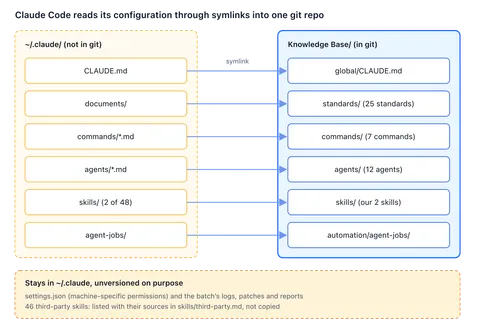
Each entry on the left is a symlink, so editing the file in the repo changes what every new session loads.
It started with the standards. They had no history, and over time they’d drifted into contradicting each other. At the end of October we moved them into the Knowledge Base and made ~/.claude/documents a symlink to them, after a test showed that CLAUDE.md imports follow a symlinked folder. The global CLAUDE.md and the commands followed in November, then the agents and our skills.
Some things stay out on purpose:
| Left out | Why |
|---|---|
settings.json |
Its permissions are specific to one Mac |
| Third-party skills | Listed with their sources instead, so they can be reinstalled |
| What the Sunday batch produces | Logs, patches and reports are output, not source |
| Secrets | Never. A note names a credential and says where it’s kept |
The project documents are versioned with their code. Because the changelog is generated from commit messages, and version numbers come from git tags, the history is part of the documentation, so the agent’s commit messages have to be good.
Agents never commit until we’ve checked the work and asked, and they never push until we ask separately. With everything in git, a bad change to a standard is one revert away, and git log tells us when a rule changed and why.
What it costs
Costs aren’t only money. Ours come in five kinds:
- Time: about a day to set it up. The first commit was on 30 October, and the Knowledge Base reached version 1.0 the next day. That day went quickly because the material already existed: it gathered up the lessons we’d been writing into project
CLAUDE.mdfiles since we started using Claude. - Money: we pay for a year of Claude’s US$20-a-month plan: AUD$341 for the year, about AUD$28 a month. At pay-as-you-go rates, one recent month of our use would have cost US$856 (about AUD$1,220), and the Knowledge Base was built in that month. That’s one developer’s heavy month, not a team’s budget: a team should budget from its own usage.
- Context: the global rules and the standards come to about 57 KB, roughly 14,000 tokens by our estimate, loaded into every session before any work starts.
- Ongoing effort: the Sunday batch saves nothing if nobody reads its patches, and the morning after its first run went on checking seven of them, one at a time. Notes need re-checking too; the script flags any that nobody has verified in 180 days.
- Opportunity: the day spent building it was a day not spent on the apps.
We haven’t measured our productivity before and after, so we won’t claim a number. What we can say is that we explain things to agents far less often than we used to.
What works, what we’d change
What works. A lesson learnt in one project now reaches all of them. A SwiftData gotcha found in Clarity is waiting for Borderstamp’s agent before it hits the same problem. /kb-update lists what a project needs to catch up with the current standards, and the checks keep the notes honest.
What we’d change. The project CLAUDE.md files grew big before the Knowledge Base existed: Clarity’s is 476 lines and Blueprint’s 335. Anthropic recommends keeping each one under 200 lines, because “longer files consume more context and reduce adherence”. Ours still hold general lessons that belong in notes, and slimming them, one project at a time, is on our to-do list. We’d also record where every third-party skill came from at the moment we install it. A few of ours took some detective work to trace.
If you’re a team, expect a different experience from ours. We haven’t run this with a team, so this part is reasoned, not seen. Shared instructions would need an owner and a review step. Notes on how someone likes to work would be per person. And every laptop’s ~/.claude folder would drift in its own direction, which makes version control matter more, not less.
If you’re building your own
- Put your instructions in git. Without history, rules drift and start contradicting each other, and you can’t tell when or why one changed.
- Write one lesson per note, and make the title the lesson. An agent scanning an index needs to know what a note says, not what it’s about.
- Write down how you like to work. Planning, approvals, commits, tone. Every correction you write down is one you stop making by hand.
- Keep the reasons. A dated decision with its context stops the same question coming back every few weeks.
- Let unattended agents propose, not commit. Have them file issues and leave patches, and review what they actually changed, not what they say they did.
What’s next?
Start small: next time you catch yourself explaining something to an agent for the second time, write it down in a file it reads, and put that file in git. If you’d like a second opinion on where agents could help your business, book a free AI Opportunity Audit. It’s 15 minutes, with no obligation and no jargon.
Your setup will look different from ours. Your mileage may vary. But write it down once, and keep it in git works for everyone.
This post was drafted with Claude Code, from our own notes and a fact sheet, and then edited by us. Our stories use Claude Code because it’s what we actually use; the ideas should apply to any agent that reads instruction files.